








Product Review: Defender GO 2K AI-Powered Security Camera

 Story by:
Eric Griffin
Story by:
Eric Griffin
It’s no secret that raising a family in the current state of the world can feel daunting. Whether it’s keeping an eye on your front door while you’re away, checking in on pets during the workday, or simply wanting a little extra peace of mind at night, reliable home security has become less of a luxury and more of a necessity. Even beyond families, having the ability to monitor your home, office, or property in real time brings a level of confidence that’s hard to put a price on. Fortunately, Defender has spent nearly three decades building a reputation around making dependable security accessible without forcing consumers into overly complicated systems or premium price tags.
In this review, we’ll be taking a closer look at the Defender GO 2K AI-Powered Security Camera, a compact indoor/outdoor solution designed to deliver sharp video quality, smart detection features, and flexible storage options at an approachable cost. We’ll walk through the installation process, explore the ClearVu mobile app experience, break down the camera’s capabilities, and take a look at the available Cloud upgrades to help determine whether the Defender GO 2K is the right fit for your security needs.
Setting Up
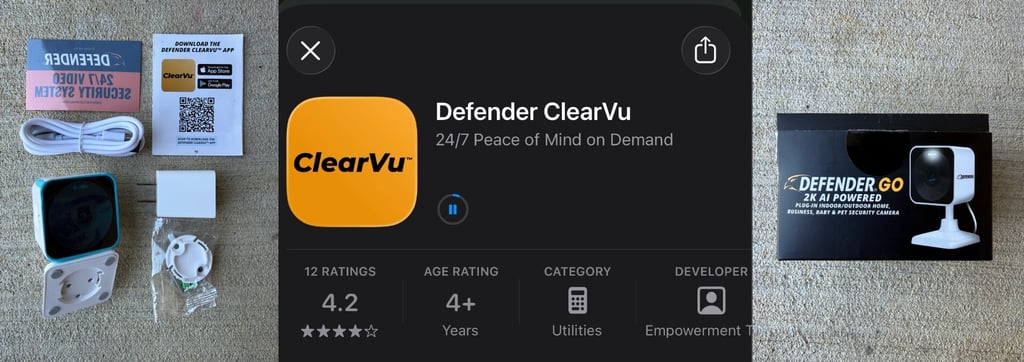
From start to finish, the setup and installation process for the Defender GO 2K was refreshingly smooth. Inside the box, you’ll find everything needed to get up and running quickly:
- Defender GO 2K Camera
- Power cable
- USB power adapter
- Adjustable mounting base with screws
- “Protected By Defender” window sticker
- Quick-start installation/app guide
Defender keeps the onboarding process simple right from the start. A QR code printed directly on the installation guide takes you straight to the Defender ClearVu app in your device’s app store. Once inside the app, the home screen immediately prompts you to add a new device. Scanning the QR code located on the top of the camera begins the pairing process, and the app walks you through each step with clear, easy-to-follow instructions. After a couple brief confirmation screens, the ClearVu app searches for nearby devices and quickly detects the camera. From there, you’ll be prompted to connect and configure your Wi-Fi settings.
Before reaching this stage, be mindful of the fact that the app will default the Wi-Fi network to whatever your phone is currently connected to, so you can avoid the extra step during setup by ensuring your phone is already on the same network that you want your camera on. After entering your password and granting permission for the app to locate devices on your local network, the camera begins connecting. A progress screen displays the setup percentage in real time, and in our experience the entire connection process took roughly 30 seconds before reaching the “Device Added Successfully” screen. At that point, all that’s left is assigning a name to your camera and selecting “Get Started.”
Overall, Defender delivers a straightforward installation experience that feels polished and very approachable, especially for users who may not be particularly tech-savvy. If you’ve installed any modern smart-home device before, the process will feel immediately familiar, but even first-time users should have little trouble getting everything connected and operational within just a few minutes.
Exploring ClearVu
In a day and age where so many apps feel bloated and overcomplicated, ClearVu’s clean and straightforward interface is genuinely refreshing. ClearVu offers just that. With one click from the home screen you can:
- Toggle view layout for your different devices
- Connect to the Support Center screen
- Add a Device
- Access any of your device feeds*
- Link to the Shop, Events, or Account pages
- Access the Cloud upgrade page
*Quick Note: We noticed that when the app Home screen initially loads, it takes a few extra seconds for paired devices to show up in the menu. So no need to worry if you fire up the app and nothing shows up at first.
The Shop tab is straightforward, directing you to the Defender site to view available devices for purchase. Under Events you can access all alerts from all of your devices. Without any paid Cloud upgrades these will be limited to ‘Motion Detected’ or ‘Person Detected’ events, but with the Cloud Storage Upgrade you also have access to Smart AI detection. This expands the capabilities for your camera to include detection of vehicles, pets, and more.
Your Account tab will be the place to view and manage your settings and systems messages, access any device updates, saved videos, or screenshots from your devices, or even enable sharing among your devices.
Device Feed
One of the first things that stood out during testing was just how sharp the camera feed looked. The Defender GO 2K delivers an impressively clear image, to the point where I’d comfortably rank it among the best-looking in-home security cameras we’ve personally used. Once you’ve entered into your device feed, there are a handful of options to choose from. The menu bar directly beneath your live feed can be broken down as follows:
- Intercom – allows you to talk through your camera
- Playback – With the Cloud Service upgrade activated, the Cloud Playback screen allows for continuous event recording, encrypted storage, and lossless video preservation. If you are using a paired device that is compatible with a FAT32 memory card, you can also use this screen to access SD Card Playback, which does not require any paid upgrade since all of the footage would be stored locally.
- Spotlight – While the camera automatically shines a spotlight on any detected movement when in the dark, this button can toggle the spotlight on and off manually as needed. This feature is more useful for cameras installed for outdoor security.
- Night Vision – This toggles automatically at night, but can be controlled here manually as well.
- Siren – This feature has a variety of uses, but is self-explanatory in its ability to create a loud alert directly through the camera speakers.
Below the main menu bar you can cycle through all the events that your camera has triggered, with filtering options for detection type.
Finally, in the upper right corner you can access the Settings. Here you will find options for Device Sharing, Function settings (Recording, Image & Sound, Light, etc.), and General Settings (Network, Feedback, and Reboot options). Additionally, if you ever need to delete your device, this can be done from the Settings page.
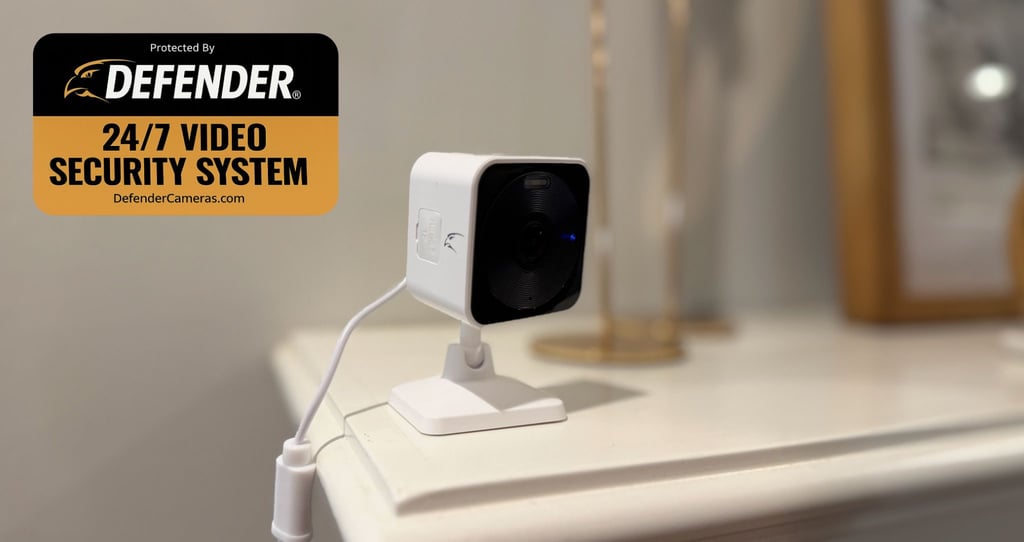
GO Big or GO Home
When it comes to expanding the Defender ecosystem, there are two primary upgrade paths to consider: Cloud Storage subscriptions and Unlimited Membership plans.
Cloud Storage
As briefly mentioned above, the Cloud Storage upgrades additionally allow for benefits around storage, data encryption, faster playback, and other detailed privileges. The options outlined below are per device, with additional options for multi-device plans outlined further down:
- Go Cloud Basic – Event recording for 7 days, with options for Monthly or Annual plans
- Go Cloud Plus with AI Pet/Vehicle Detection – Event recording for 30 days, with options for Monthly or Annual plans.
Even with the Plus plan annual option you’d be committing to less than $100/year, and I can personally attest to the importance of round-the-clock access to your camera feeds.
Unlimited Membership
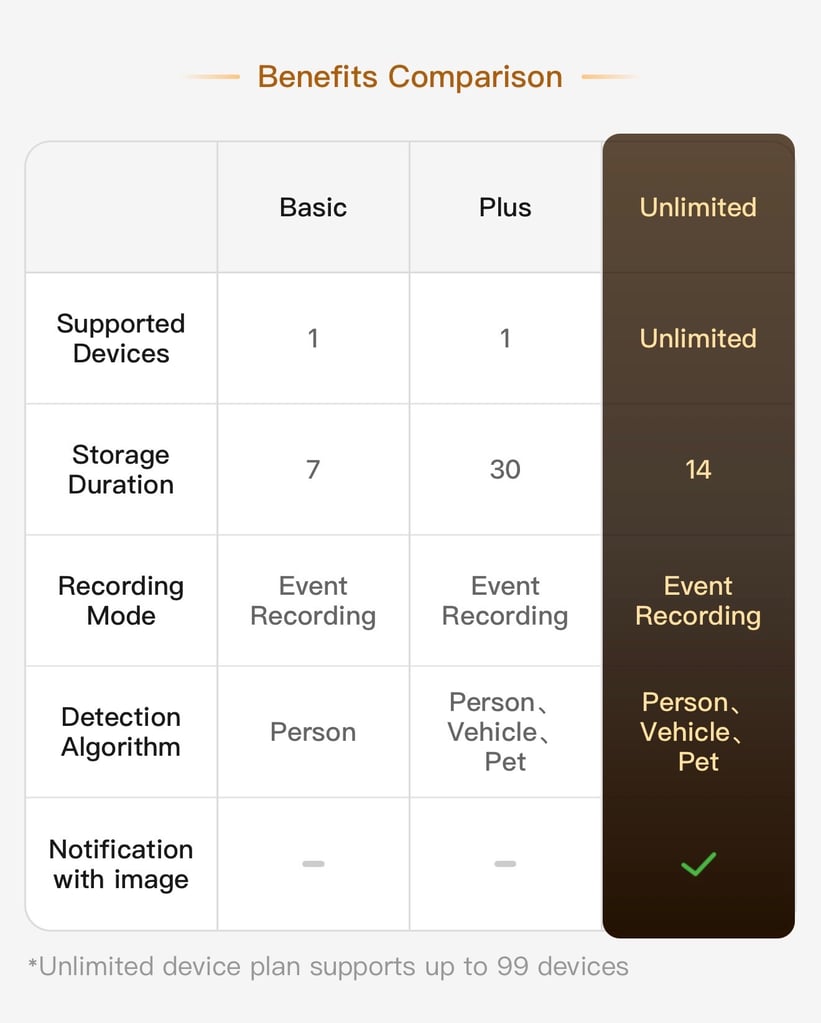
These subscription options are optimized for multiple devices. If you plan to have coverage throughout your home both indoor/outdoor with multiple cameras, this is the way to go. There’s no limit to the number of cameras that can be on this plan, and in addition you’d receive 14 days of recordings that automatically update and overwrite to ensure your storage doesn’t max out. Additionally you’d receive the Cloud recording as outlined above, AI detection, and real-time notifications. To summarize the available upgrades, the chart below does a great job of viewing the benefits side-by-side with the Cloud Storage options.
Final Verdict
At the end of the day, the Defender GO 2K succeeds at what matters most: delivering reliable, user-friendly security without overcomplicating the experience or demanding a premium price tag. The setup process is fast, the ClearVu app is intuitive, and the camera itself provides impressively sharp video quality paired with genuinely useful AI detection features.
While some of the more advanced functionality sits behind optional Cloud subscriptions, the overall ecosystem still feels approachable and reasonably priced especially for users looking to build out multi-camera coverage over time. Defender has clearly focused on creating a product that works well for everyday people, not just tech enthusiasts.
Whether you’re monitoring your front porch, checking in on pets while away from home, or adding an extra layer of protection for your family, the Defender GO 2K offers a strong balance of affordability, simplicity, and peace of mind. For anyone looking to step into smart home security without feeling overwhelmed, it’s an easy camera to recommend.

Comments 0
No Readers' Pick yet.