








Comfortable Office Chairs for Home and Work: Ergonomic Picks That Reduce Back Pain
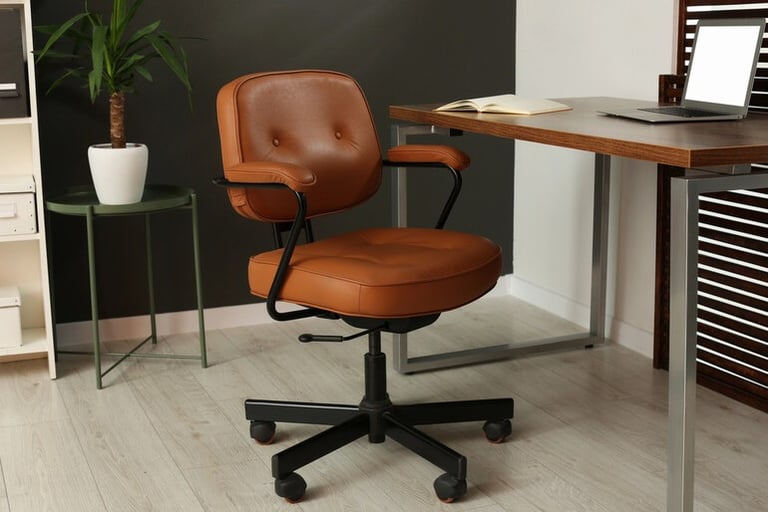
 Story by:
Health and Wellness Blog
Story by:
Health and Wellness Blog
The vast majority of people grossly overestimate the effects of being seated at a desk. When you’re working at home or in an office building, it’s possible you could be sitting in front of your computer for about 10 hours a day. Since you had to deal with your computer screen throughout the day, you might also end up growing impatient to get exposed to more natural surroundings – for instance, casual dates, relaxed dinners, and actual interactions in regular life. Although it may seem like resting, sitting is actually a tremendous strain on your body.
The wrong seat inevitably results in a whole host of issues. The first indications that you need to pay attention to your seating configuration are a stiff neck, tight shoulders, and lower back pain. Having poor posture alignment means not only will it hurt because of the pain you will feel, but it will affect you negatively in the way that it will be difficult for you to feel productive when performing different tasks throughout the day, because you will spend most of your time looking for a comfortable position. Fortunately, there is an upside to the issue because the chairs can be modified to help you with a designed office chair that acts as a powerful tool to improve your posture, support your spinal alignment, and reduce strain during long working hours.
Why Standard Office Chairs Cause Back Pain
You might wonder why that basic, cheap desk chair you bought a few years ago leaves you feeling so sore. Standard office chairs simply do not account for the natural curvature of the human spine. They force your body to adapt to the chair, rather than the chair adapting to your body. The primary culprit is a severe lack of lumbar support. Your lower spine naturally curves inward. If you don’t have a chair to sit on that conforms to this curve, you will definitely slouch.
This slouching will take the natural curve out of your spine and put a tremendous strain on your spinal discs. Plus, the basic chairs will force you into a suboptimal posture alignment. They typically don’t have all of the adjustments to hold your feet flat, knees in the proper position, and your arms supported. Standard chairs don’t recline or tilt very easily, thus producing static sitting pressure on the spine. The muscles tighten to support you, and in time, tension becomes constant discomfort and stiffness.
What Makes an Ergonomic Office Chair Different?
If standard seating causes problems, what makes an ergonomic office chair a better choice? The answer lies in adjustability and intentional design. An ergonomic office chair is engineered to support the body in motion. Unlike rigid seats, these chairs feature a posture support chair design that adapts to your unique shape and size. The most crucial difference is adjustable lumbar support. You can position the support pad exactly where your lower back needs it, maintaining that vital spinal curve.
Allowing customisation of seat height and depth for these chairs as well. If it is too deep, it will obstruct blood flow behind the knees, and if it is too shallow, it will make the thighs unsupported. Ergonomic designs offer the possibility of sliding the seat to an optimum length. In addition, they include reclining and support for moving. They permit you to rest back, gradually taking the weight off the lower spine and onto the backrest, providing your muscles with relief throughout the day.
Key Features to Look for in a Comfortable Office Chair
Knowing what features the ideal office chair that will ease back pains needs is handy when looking for one to give you more comfort in your daily activities to embrace your beautiful life. Do not go by the attractive and fashionable features, but rather get one that will see you through those long working hours. Comfort, which can impact mood, energy, and even social and romantic life after a long day of work, can be especially important to people who are trying to find a better work-life balance.
Adjustable Lumbar Support
This is non-negotiable. Find a lumbar support chair that has a support pad that moves up, down, in, and out of the chair. Your spine in the lower back needs just the right kind of cushioning to avoid back slumping.
Breathable Material
Your body temperature is changing as you work. Air vents through mesh backrests to provide ventilation and maintain comfort and coolness. Select a padded cloth or leather chair, and ensure that there isn’t any sort of heat retention in the material.
Soften Your Seat and Adjust the Depth.
You need a seat cushion that is thick and doesn’t get soft after a month of use. Adjusting the seat depth is also an important factor. Sitting at an angle, be able to sit so your back is fully supported by the backrest, and there is a gap of 2-4 inches between the front of the seat and the rear of the knees.
Adjustable Armrests
Arms fixed on armrests can cause you to raise your shoulders or lean forward. Find a chair easier to sit on, one with 3D or 4D armrests. These can be used to height, width, and angle, letting your elbows sit in a natural position at 90 degrees.
Swivel and Mobility
Castor quality and a smooth swivel base will mean you don’t twist yourself awkwardly trying to reach out across the desk. Just make sure the castors are suitable for either a hardwood floor or deep carpet.
Best Ergonomic Picks for Home and Work
Choosing the right chair is dependent on a variety of things, such as the requirements you may have, budget, and the space in the desk. Below are some great possibilities that will help you choose an office chair for your needs.
Ideal for Extended Periods of Time.
If you’re sitting for 8 hours at work, you should have an ergonomic chair that is made to offer support during extended time periods. Look for models that have bend-back seats and tilt mechanisms that are synchronised. With these mechanisms, the recline angle of the backrest and the seat pan can be set to each other, and this maintains the feet firmly on the floor while leaning back to take a phone call or read a long document.
The Best Budget Ergonomic Office Chair is the best ergonomic office chair available today.
It doesn’t need to cost a lot of money to safeguard your back. The most affordable alternatives concentrate on the fundamental features: breathable mesh back, fundamental lumbar support, and adjustable height. You may need to trade out the extra bells and whistles, such as 4D adjustable armrests or aluminium frames, but a quality budget ergonomic office chair will be much superior to a dining chair or basic office stool. Look for models with a thick and dense seat foam that will last for a long time.
Low-Cost Ergonomic Office Chairs Available.
If you’re willing to pay for the very best in comfort, then high-quality chairs provide the ultimate in support. These serve as a “second spine”. They include smart suspension products to equally disperse your weight, with no pressure points. Typically, premium picks come with an automatic tension adjustment feature, which is a benefit as it ensures the resistance of your reclination is set just right due to its weight detection. High-end chairs for posture support may drastically improve your daily life if you experience chronic back pain.
The Best Compact Chair for Small Home Offices is What You Are Looking For.
Everyone doesn’t have a big room to dedicate to studying in. If you do choose to make use of the corner or alcove in the bedroom to create your desk, then you want a chair that could fit in the space you have intended for the work surface, whilst still supporting your back. Ergonomic chairs. These printers often have smaller footplates, bases, and sometimes armrests that fold under the line of your work table, making them the perfect fit when needed. Keep in mind, the small dimension should also be supportive enough for your lower back.
Office Chair Setup Tips to Reduce Back Pain
Buying a fantastic office chair is only half the battle; setting it up correctly is just as important. Even the most advanced ergonomic desk chair will not help if it is poorly adjusted.
Here are the steps to follow to optimise your seating position:
- Feet planted firmly on the ground: It is important that you are sitting high enough to ensure that your feet can be planted firmly on the ground. Make sure your knees are parallel to your hips and a bit lower than your hips. Should your table be too high, then your chair would require adjustment to be raised. Consider using a footrest to support your legs.
- Eye-level screen positioning: The monitor should be placed at eye level, at an arm’s length from you. The top third of your monitor should be at eye level so as to ensure that you do not tilt your head to view your screen.
- Slightly reclined posture: Avoid sitting at an exact 90° angle. Allow your backrest to tilt backward at approximately 100 to 110° angles, since this will decrease spinal disc pressures greatly.
- Frequent breaks from work: There is no alternative to taking frequent breaks from work and allowing yourself time to move around.
Invest in Comfort, Not Just Aesthetics
It is not difficult to choose an office chair that will look good in the office environment when building the workspace. The attractive design of the chair may also be important, but if the chair does not provide any back support, its effect will go beyond appearance and affect the physical state of the person using it. That daily pain can also have a trickle-down effect into one’s personal life away from the workplace, particularly if the person has less energy to indulge in leisurely dating nights in 2026, socialising, or significant dates after a long day at the office.
A good ergonomic office chair is a worthwhile investment in your health. If you have a chair with superb back support, adjustable features, and built to last, then you are actively safeguarding your back. Pay attention to the positioning of your body and its support, rather than design. You’ll thank yourself for it when your back tells you in the years to come.


Comments 0
No Readers' Pick yet.